Ideas
What a small agency should automate first
Updates, checks, alerts and reports are worth handing to a machine. Judgement calls and anything without a way back are not.
A small agency’s week is mostly the same twenty minutes, repeated. Sign in to a site, look at the updates, take a breath, press the button, look at the front page, move to the next one. Twelve sites at twenty minutes each is four hours. Add a check that everything is still up and a note to each client about what changed, and the month is gone before any new work starts.
“What should we automate first” is the right question, and it has a plain answer that most people already know: automate the thing that is frequent, has a known good outcome, and has a way back. Do not automate a judgement call, a conversation with a client, or anything destructive that cannot be undone. The interesting part is applying that test to the actual list.
The test
Three questions, in order.
- Does it happen every week, on every site? If not, the setup costs more than the saving.
- Do you know what “done” looks like before you start? An update is done when the new version is on disk and the front page still renders. A redesign has no such line.
- Is there a way back? If the answer is no, the machine may prepare the change and a person presses the button.
Anything that passes all three goes first. Anything that fails the third stays in human hands, whatever the tooling promises.
Worth automating first
Updates, as a job with a snapshot
Plugin updates pass all three questions, on one condition: the way back has to exist before the update runs. In ReDock Web every plugin update is two steps on each site, snapshot then update, and a site that cannot make the snapshot is skipped rather than updated. If the update goes wrong, Restore puts the old version back in one press.
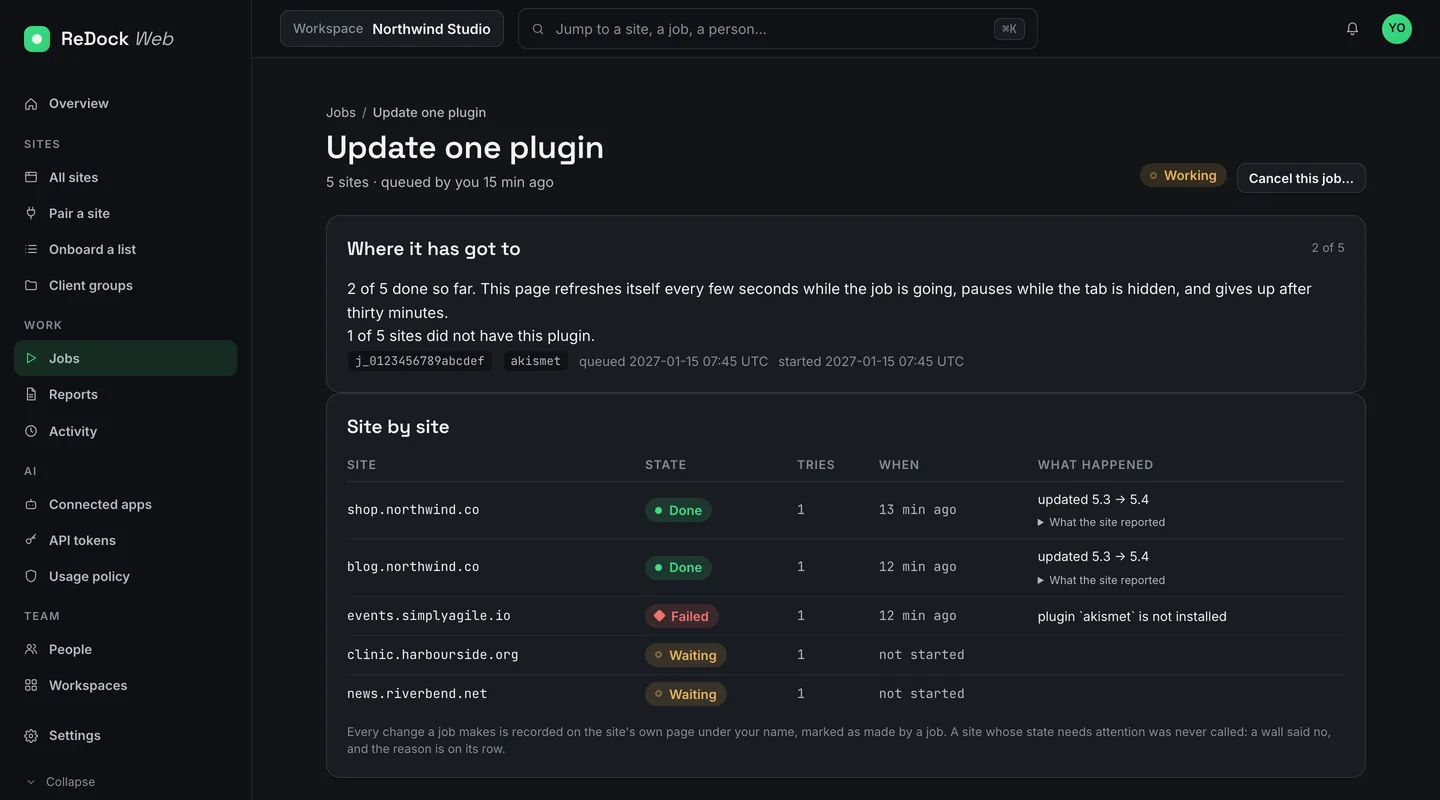
The job in the picture above is one plugin across five sites. Two are done, with the versions that changed on their rows. One failed because that site never had the plugin, and its row says so in the site’s own words while the rest carries on. Two are waiting. You pick the sites, or a client group, or all of them, confirm once, and close the tab. When the job ends, the sites that failed can be run again as a new job, and the first one stays as the record.
Automated does not mean unattended here. A person still queues the job and confirms it. The machine does the repetition and the record-keeping.
Checks, in sentences
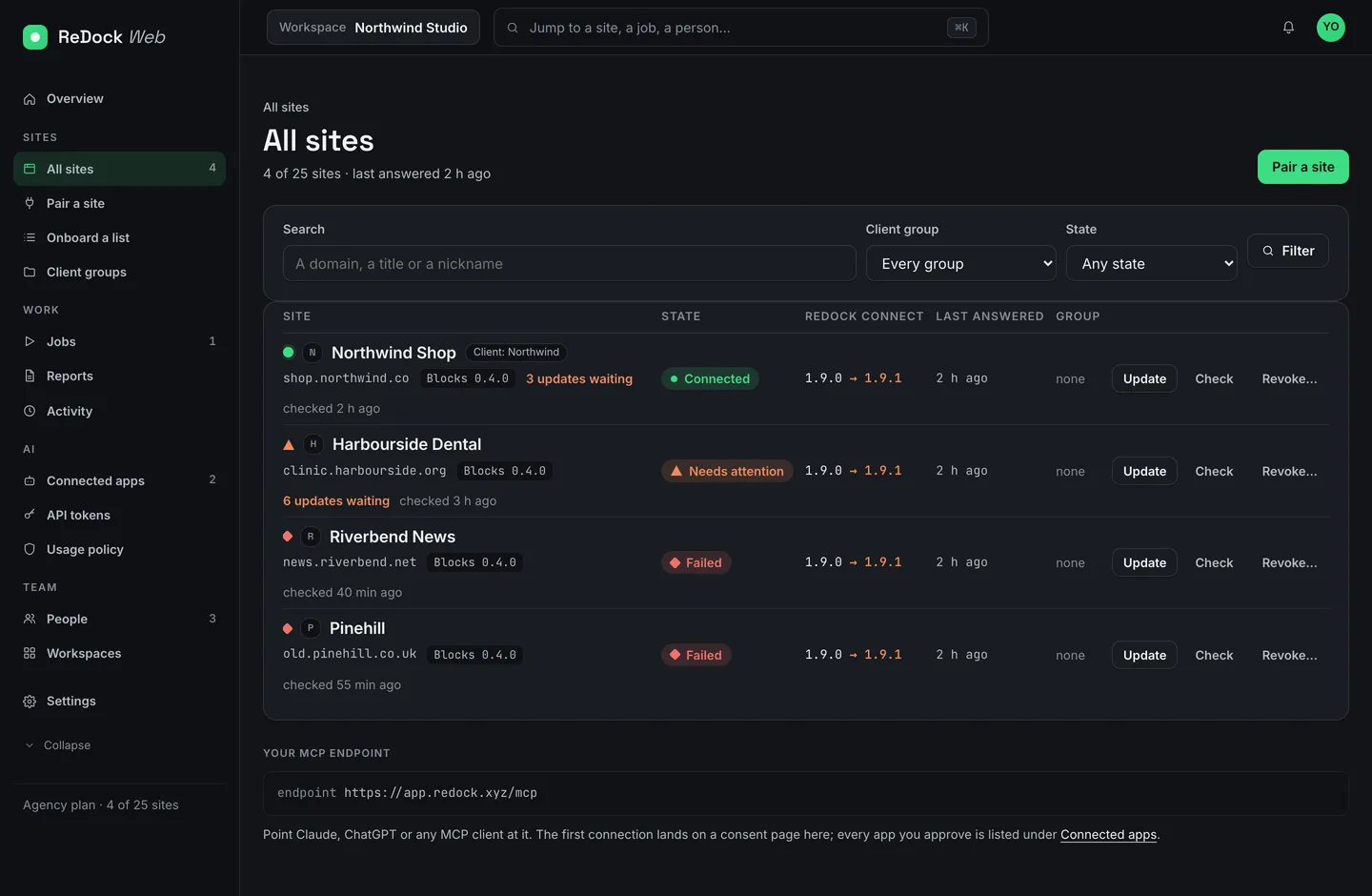
Checking is the purest case: frequent, a known outcome, and nothing to undo. Uptime is checked from outside on a schedule you set, every minute, every five or every fifteen. Health is looked at several times a day and written as reasons, never as a score: the site did not answer the last four checks, PHP reached end of life on a date, WordPress is behind, WP-Cron is switched off, a new client key appeared. Once a day the core files are compared with WordPress.org. The list sorts by what needs attention, so the morning look is the top of one page rather than twelve tabs.
Alerts
An alert is a check with a consequence. Owners can have an email when a site goes down. That is the whole feature, and it is enough. The thing you want to know at seven in the morning is that one site, not a digest.
The client’s month
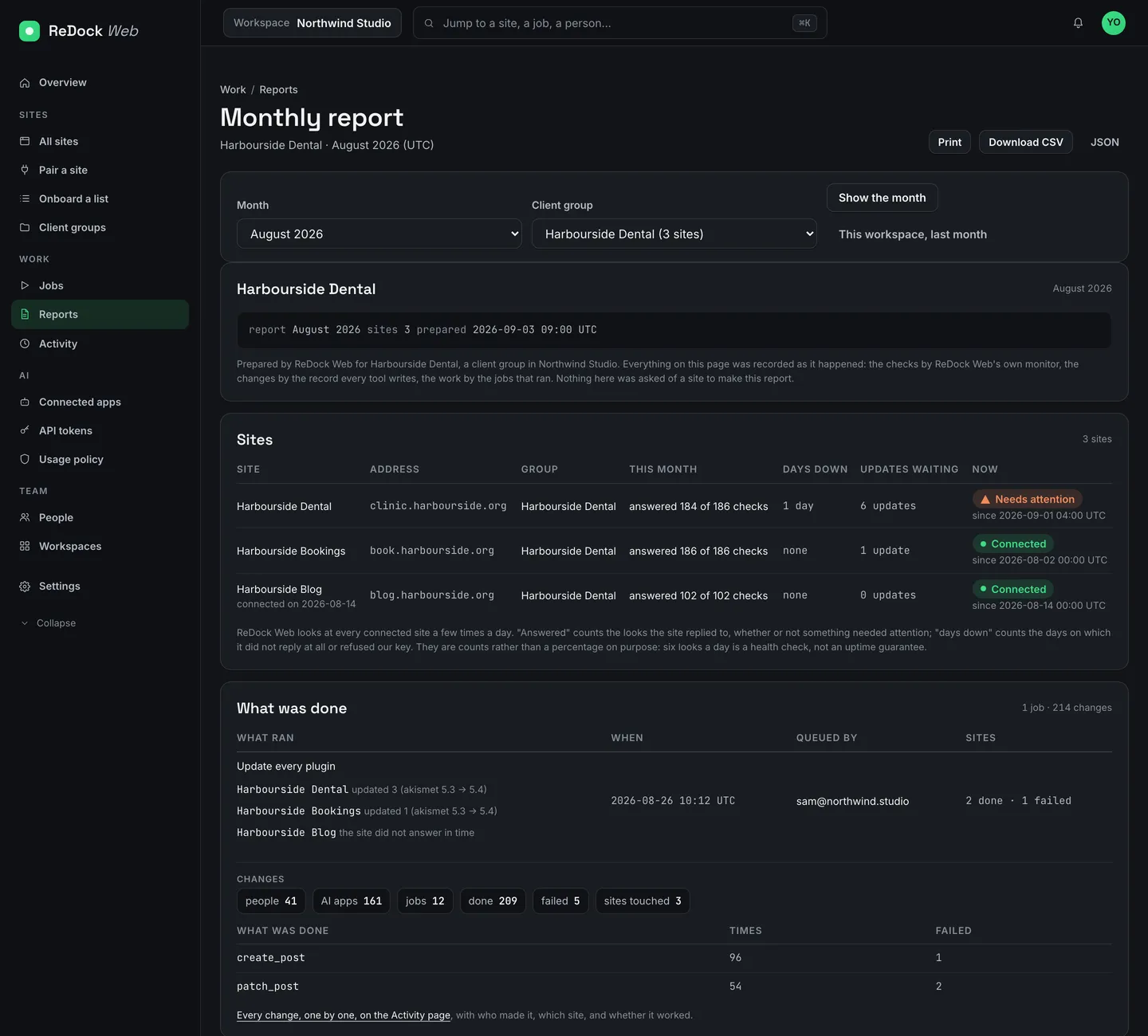
A report passes the test because every number in it was already recorded as it happened. ReDock Web writes one per client group or per workspace: the checks each site answered, the days it was down, the jobs that ran and who queued them, every change counted by tool, what needs attention today, and the calls that were refused. Nothing is asked of a site to make it. Print it, download it as CSV or JSON, or have it emailed on the first of the month, with your own name, logo and colours on the client’s copy.
Not yet, or not ever
Judgement calls. Whether to replace a plugin that keeps failing, whether a theme change is worth the client’s raised eyebrows, whether a slow site is the host’s fault. These need a person, and the product knows it. When you switch a theme from a site’s page, it asks first, naming what the site wears now and what it would wear. In the build’s recorded run of 3 September 2026, “nothing switched while the question was open”.
Client conversations. A report is not a conversation. Send it, then talk. The automation earns you the time for the call. It does not make the call.
Anything without a way back. Some actions have no undo by their nature, and the honest thing a product can do is say so. Running a scheduled hook by hand is one. The same recorded run notes that the page “says plainly that a hook’s effects have no undo”. Replacing text across a database is another, so the tool counts first: the parity run of the same week answers a search and replace with “dry run” and “nothing changed”, and tells the caller to repeat it with the confirm flag to apply. Deleting a plugin asks for that flag every time. If you hand any of these to a machine, hand it the preparation and keep the press.
An AI is a fifth kind of automation
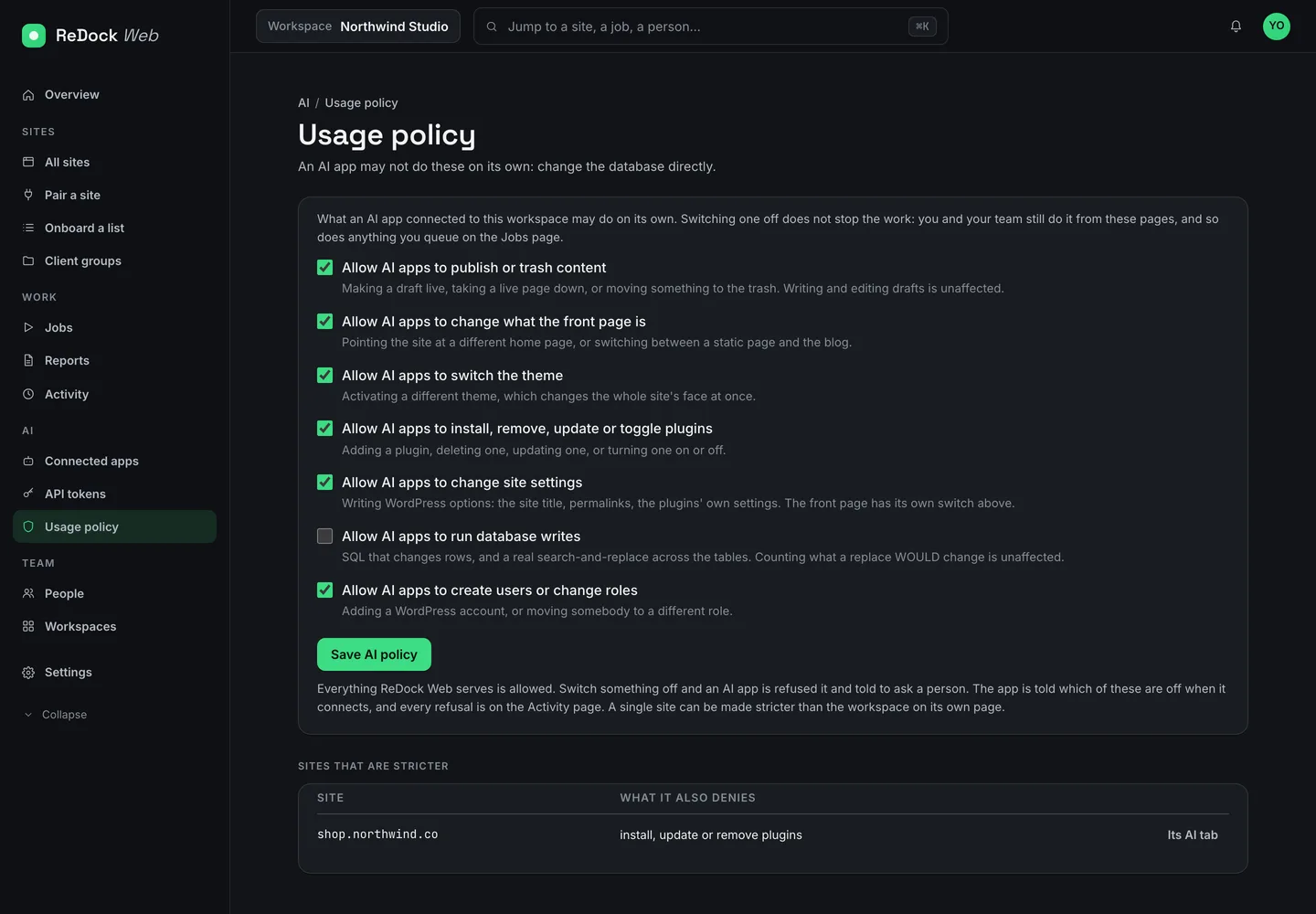
An assistant connected to your sites is subject to the same test, with one difference: it can decide to act. That is why ReDock Web has seven switches that say what an AI app may do unasked, from publishing to database writes, and why every refusal is recorded next to the changes. We wrote about the switches as a way of thinking about delegation. The short version is that the assistant goes last, after the checks, the updates and the report have already become boring.
A starting order
Our suggestion for an agency with a dozen sites, in the order we would do it:
- Connect the sites and let the checks run for a week. Read the reasons. Turn on the down alert.
- Run plugin updates as a job, with the snapshot in front of them, and retry the failures rather than chasing them by hand.
- Send the first client report on the first of the month. Read it before the client does.
- Only then decide what an assistant may do without asking, one switch at a time.
One live site is free on ReDock Web, which is enough to run this order on a site you own before you run it on a client’s. Create a workspace, or read the ReDock Web page first.
Questions
Does ReDock Web take backups?
Two kinds. Before a plugin update it takes a snapshot of that plugin, so a bad update can be put back in one press. And every day it makes a full archive of each site and copies it to your own Google Drive, keeping the last fourteen.
Does it scan for vulnerabilities?
Yes. Every hour it compares every plugin and theme with the published vulnerability records (sourced from Wordfence Intelligence and MITRE) and marks an affected plugin with the version that fixes it. It also checks uptime from outside on a schedule you set, looks at health several times a day, and compares the core files with WordPress.org once a day.
Can a job run without a person?
A job is queued and confirmed by a person, then runs on its own across every site you picked. You can close the tab. The result and every change are recorded, and the failed sites can be run again as a new job.